Add skills, tools and hooks
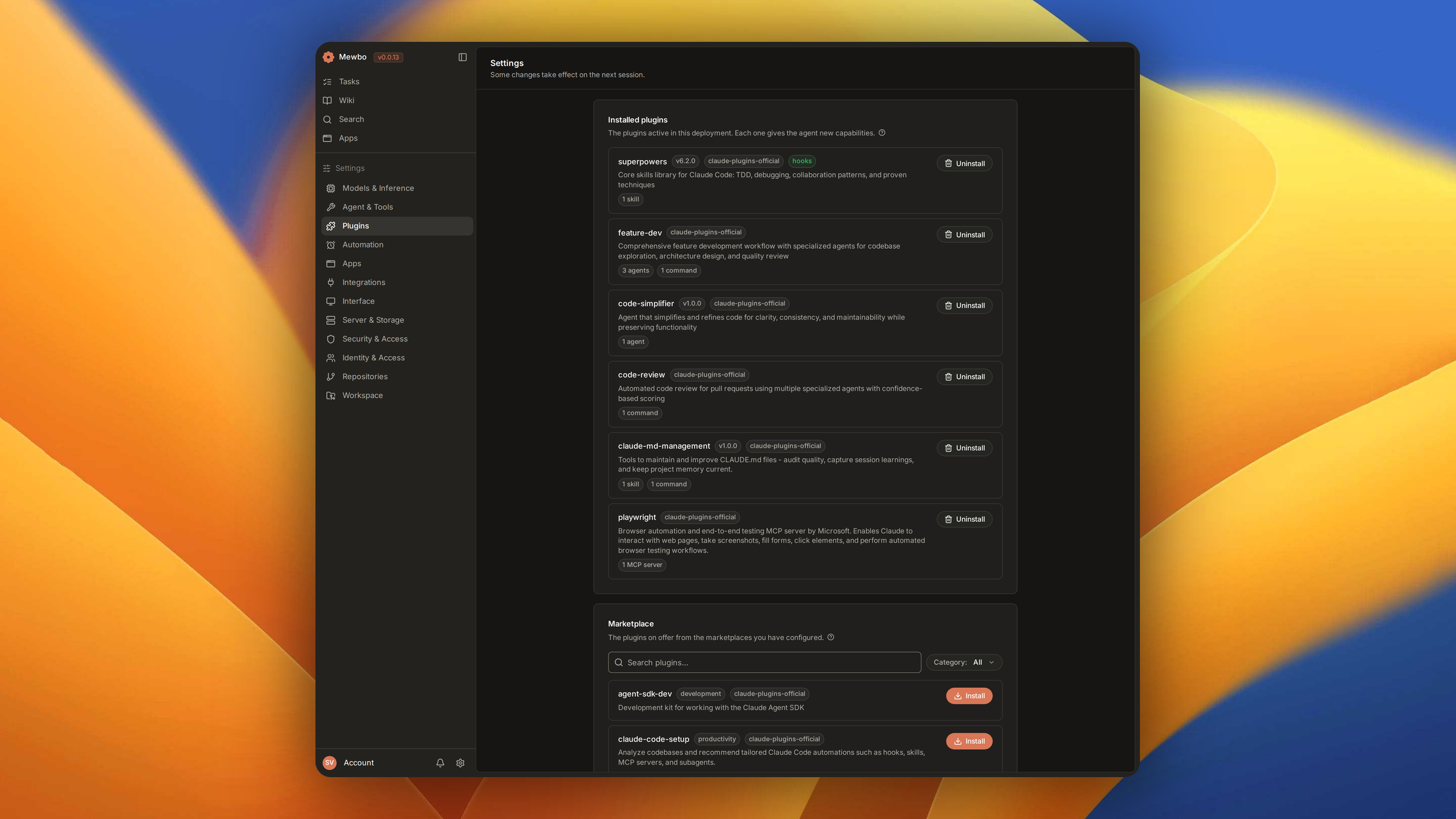
Plugins add agent definitions, skills, hooks, MCP servers and session tools to a running Mewbo. Install one from a marketplace or a local directory and it activates at the next session start, with no restart. Nothing marks its contributions as second class, and its hooks fire alongside native ones.
Drop-in compatible with Claude Code plugins
Mewbo reads the exact same Claude Code plugin manifest, directory layout and marketplace format, so a plugin authored for Claude Code runs unchanged. The default catalog is the official Claude plugins marketplace, and any private one following the same schema loads from any git host.
For setup and installation, see Getting Started.
What a plugin can add
| Contribution type | How it works |
|---|---|
| Agent definitions | .md files in agents/, addressable via agent_type in spawn_agent |
| Skills | SKILL.md files under skills/<name>/, added to the skill catalogue at session start |
| Hooks | hooks/hooks.json, firing on pre_tool_use, post_tool_use and on_session_end |
| MCP tool configurations | .mcp.json at the plugin root, merged into the session's MCP server list |
| Session tools | Python classes listed under session_tools in plugin.json. See Session tools. |
Plugin directory layout
A plugin is a directory. Every entry below except the manifest is optional.
my-plugin/
├── .claude-plugin/
│   └── plugin.json          # required manifest
├── agents/
│   └── code-reviewer.md     # agent definition
├── skills/
│   └── my-skill/
│       └── SKILL.md         # skill file
├── hooks/
│   └── hooks.json           # lifecycle hooks
└── .mcp.json                # MCP server configuration
plugin.json manifest
{
  "name": "my-plugin",
  "description": "A short description",
  "version": "1.0.0",
  "author": "Your Name",
  "requires-capabilities": ["stlite"],
  "session_tools": [
    {
      "tool_id": "submit_widget",
      "module": "my_plugin.submit_widget",
      "class": "SubmitWidgetTool"
    }
  ]
}
| Field | Required | Description |
|---|---|---|
name |
Yes | Unique plugin name, used as the registry key |
description |
No | Free text |
version |
No | Semver string |
author |
No | Name, or an object with a name key |
requires-capabilities |
No | Capability ids the bundle needs, unioned into every agent and skill it contributes. See Capability gating. |
session_tools |
No | {tool_id, module, class} entries implementing the Session tools protocol |
Table 1. Every field of plugin.json. Only name is required.
Path substitution
| Placeholder | Resolves at | Resolves to |
|---|---|---|
${CLAUDE_PLUGIN_ROOT} |
Discovery | Absolute path to the plugin's install directory |
${SESSION_ID} |
Spawn | The current session's id |
${MEWBO_WIDGET_ROOT} |
Spawn | Widget output root, widget-builder only. :- default syntax supported |
Table 2. Placeholders a plugin's .mcp.json, hooks/hooks.json, agents/*.md and skills/*/SKILL.md bodies
can reference.
Substitution is a single linear replace pass with no template engine, so a body carrying no
placeholders comes out byte for byte the same.
Installing plugins
Via CLI
/plugins                          # list installed plugins and their components
/plugins marketplace              # browse available plugins
/plugins install <name>           # install from the default marketplace
/plugins uninstall <name>         # remove an installed plugin
Via the console
Open the Plugins view from the navigation rail. The Marketplace tab lists what is available to install.
Via API
| Method | Endpoint | Description |
|---|---|---|
GET |
GET/api/plugins | List installed plugins and their components |
GET |
GET/api/plugins/marketplace | List available plugins from all configured marketplaces |
POST |
POST/api/plugins/marketplace | Install a plugin: body {"name": "plugin-name", "marketplace": "Official"} |
DELETE |
DELETE/api/plugins/{plugin_name} | Uninstall a plugin by name |
Configuration
Plugin system settings live under plugins in configs/app.json.
| Key | Type | Default | Description |
|---|---|---|---|
plugins.enabled |
boolean | true |
Enable or disable the entire plugin system |
plugins.enabled_plugins |
array | [] |
Explicit allowlist of plugin names to activate; empty = all installed plugins |
plugins.marketplaces |
array | ["anthropics/claude-plugins-official"] |
Marketplace catalogs on any git host (see forms below) |
plugins.marketplace_default_host |
string | github.com |
Default host for bare owner/repo entries |
plugins.install_path |
string | "" |
Override for the plugin cache directory; defaults to $MEWBO_HOME/plugins/ |
Each marketplaces entry takes one of three forms. The catalog is not locked to GitHub.
| Form | Example | Resolves to |
|---|---|---|
| Full git URL | https://git.example.com/team/plugins.git |
used verbatim (also http://, ssh://, git://, and scp-style git@host:team/plugins) |
host/owner/repo |
git.example.com/team/plugins |
https://git.example.com/team/plugins.git |
Bare owner/repo |
anthropics/claude-plugins-official |
https://<marketplace_default_host>/owner/repo.git (GitHub by default) |
{
  "plugins": {
    "enabled": true,
    "marketplaces": [
      "anthropics/claude-plugins-official",
      "git.example.com/team/internal-plugins",
      "https://gitlab.com/acme/plugins.git"
    ],
    "marketplace_default_host": "github.com",
    "enabled_plugins": ["code-reviewer", "doc-generator"]
  }
}
A catalog not yet cloned is shallow cloned the first time you browse or install. The cache directory
is keyed by host and owner, so two catalogs sharing a leaf name never collide. Later runs read the
cache, refreshed by a fast forward git pull.
Authenticating to private and self-hosted catalogs
Catalogs are fetched with plain git clone, so they inherit your ambient git configuration.
- HTTPS token. Provide a credential helper. In containers, mount
~/.git-credentialsin the formhttps://user:token@host. The Docker image enablescredential.helper store, andGITHUB_TOKENis still bridged togithub.comautomatically. - SSH. Use an
ssh://or scp style entry and mount an SSH key or an agent socket. Git picks it up. - A private CA. Point
GIT_SSL_CAINFOat your CA bundle. Git reads it from the environment, so verification stays on. You never need a globalGIT_SSL_NO_VERIFY.
Capability gating
A plugin can gate its agents, skills and session tools on a capability the client advertises. An
entry whose requires-capabilities is not a subset of what the session advertised gets no tool
schema and no catalog line, so nothing can invoke it by accident.
The web console sends X-Mewbo-Capabilities: stlite,apps,ask_user,generative_ui by default, one id
per surface it can render. The CLI and webhook adapters send nothing unless configured to.
Declare a capability in either place. Discovery unions the two, so one line in plugin.json overlays
every agent and skill in the bundle.
{
  "name": "widget-builder",
  "requires-capabilities": ["stlite"]
}
---
name: st-widget-builder
requires-capabilities: [stlite]
---
An empty requires-capabilities is the default and leaves the entry always visible.
Session tools
A session tool holds state for one agent instance rather than living in the global ToolRegistry.
The core exit_plan_mode tool is one. So is the widget-builder's submit_widget.
Plugins contribute session tools through the session_tools array in plugin.json.
{
  "session_tools": [
    {
      "tool_id": "submit_widget",
      "module": "mewbo_core.builtin_plugins.widget_builder.submit_widget",
      "class": "SubmitWidgetTool"
    }
  ]
}
The class must implement the SessionTool protocol, whose members are listed under
Architecture Overview → Session tools. An agent spawning with
one of those tool ids in its allowed_tools gets its own instance. Dispatch, schema injection and
termination take the same path as any bound tool, and core carries no widget branch.
Built-in plugins
Some plugins ship inside the product rather than in a marketplace, and need no
installed_plugins.json entry.
| Plugin | Ships in | Capability | What it contributes |
|---|---|---|---|
| widget-builder | mewbo_core |
stlite |
st-widget-builder agent + skill, submit_widget session tool, an stlite example library, and an AST-based import allowlist |
| wiki | mewbo_graph |
wiki |
The Agentic Wiki suite. The wiki-indexer, wiki-enricher, wiki-page-writer and wiki-qa agents, plus the wiki_* session tools they run on |
| scg | mewbo_graph |
scg |
The Source Capability Graph suite behind Agentic Search. The scg-mapper and scg-search agents, plus the scg_* session tools they run on |
Table 3. The three bundled suites, at builtin_plugins/, plugins/wiki/ and plugins/scg/.
How a library ships plugins
A plugin whose tools wrap a heavier substrate ships with that substrate, never in the core wheel.
The wiki and SCG suites live in mewbo_graph because their tools import the graph engine. So a lean
install without mewbo_graph registers neither suite, and those features are absent rather than
broken.
Writing a local plugin
Put the plugin directory anywhere on disk and add an entry for it to an installed_plugins.json. Two
paths are scanned, ~/.claude/plugins/installed_plugins.json and one in the plugin cache directory
that plugins.install_path sets. The CLI install flow is the alternative, with a relative path
source in a local marketplace.json.
The smallest working plugin is a directory holding only .claude-plugin/plugin.json. Everything else
is discovered automatically. The bundled widget-builder is a complete example at packages/mewbo_core/src/mewbo_core/builtin_plugins/widget_builder/.
How it works internally
See Architecture Overview → Plugin loading and Capability overlay.