Everything a session starts with
These tools are bound before the first turn, and none needs an MCP server or an external process. They read files, edit them, run shell commands, list directories, query language servers, move the session between projects, put a question back to you, and fetch the schemas of tools that were deferred to save context.
A connected client can also contribute tools of its own for the length of a session — that is how a session reaches an Android phone. See Tools a client brings with it.
For setup, see Getting Started. For permissions and approval modes, see The Interface.
Tool catalog
| Tool ID | Name | Read-only | Description |
|---|---|---|---|
read_file |
Read File | Yes | Line-windowed file reader |
aider_list_dir_tool |
List Directory | Yes | Recursive directory listing |
aider_shell_tool |
Shell | No | Run arbitrary shell commands, foreground or background |
shell_session_tool |
Shell Session | No | Read output from, write input to, or stop a background shell |
aider_edit_block_tool |
Aider Edit Blocks | No | Apply Aider-style SEARCH/REPLACE blocks to files |
file_edit_tool |
File Edit | No | Exact string replacement with old_string / new_string |
home_assistant_tool |
Home Assistant | No | Smart home control (enabled when Home Assistant is configured) |
lsp_tool |
Language Server | Yes | Code diagnostics, go-to-definition, references, hover |
tool_search |
Tool Search | Yes | Fetch the schema of a deferred tool so it becomes callable |
A session also binds update_todos, ask_user_question, present_ui, list_projects, and
switch_project, each under the conditions its section names below. Every tool returns a JSON payload tagged with kind, and the
shapes are listed under
Architecture Overview → Built-in tools.
Tools a client brings with it
The catalog above is what the server carries. A client can add tools of its own for the length of a session, and the server runs no code for them: it delivers the call down the session's live stream, the client executes it, and the client posts the result back.
The Android app is the one that does this today. It offers device_* tools that act on the phone
itself — reading the time or battery, setting an alarm, sending a text, and, once you turn it on,
seeing and using the screen. Which of them a session gets depends on what that phone currently
permits, so the list is decided per session rather than per deployment.
Two consequences worth knowing. A device tool exists only while a client is attached to serve it, so it is absent from a session driven by a trigger or the API. And a permission you have not granted means the tool is never offered at all — the model is not told about a tool it would only fail to call.
- Device Tools — the full list, what each needs, and the screen-control gate.
- Device Tool Bridge — the wire contract a client implements to offer its own.
read_file
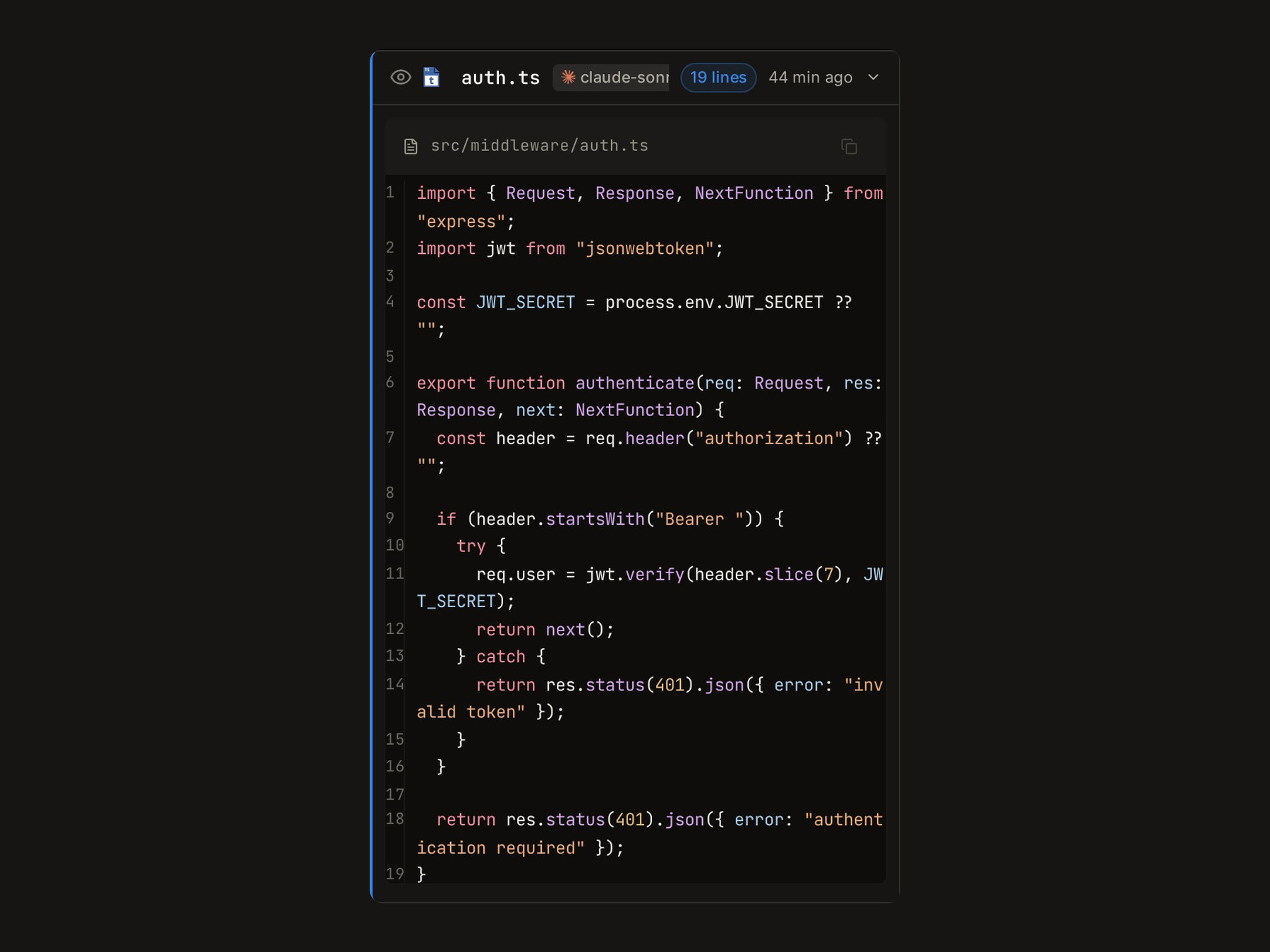
read_file returns a line-windowed slice of a file, numbered from 1 like cat -n output.
Repeated reads of the same slice are deduplicated, so identical content never costs context twice.
Parameters
| Parameter | Type | Required | Description |
|---|---|---|---|
path |
string | Yes | File path to read (relative paths resolved against root) |
root |
string | No | Project root used for safe-path resolution (defaults to CWD) |
offset |
integer | No | 0-based starting line; defaults to 0 |
limit |
integer | No | Maximum lines to return; defaults to 2000 |
A truncated window ends with ... (truncated - use offset/limit to read more).
File editing
Mewbo has two editing backends. Both apply edits atomically and return a unified diff.
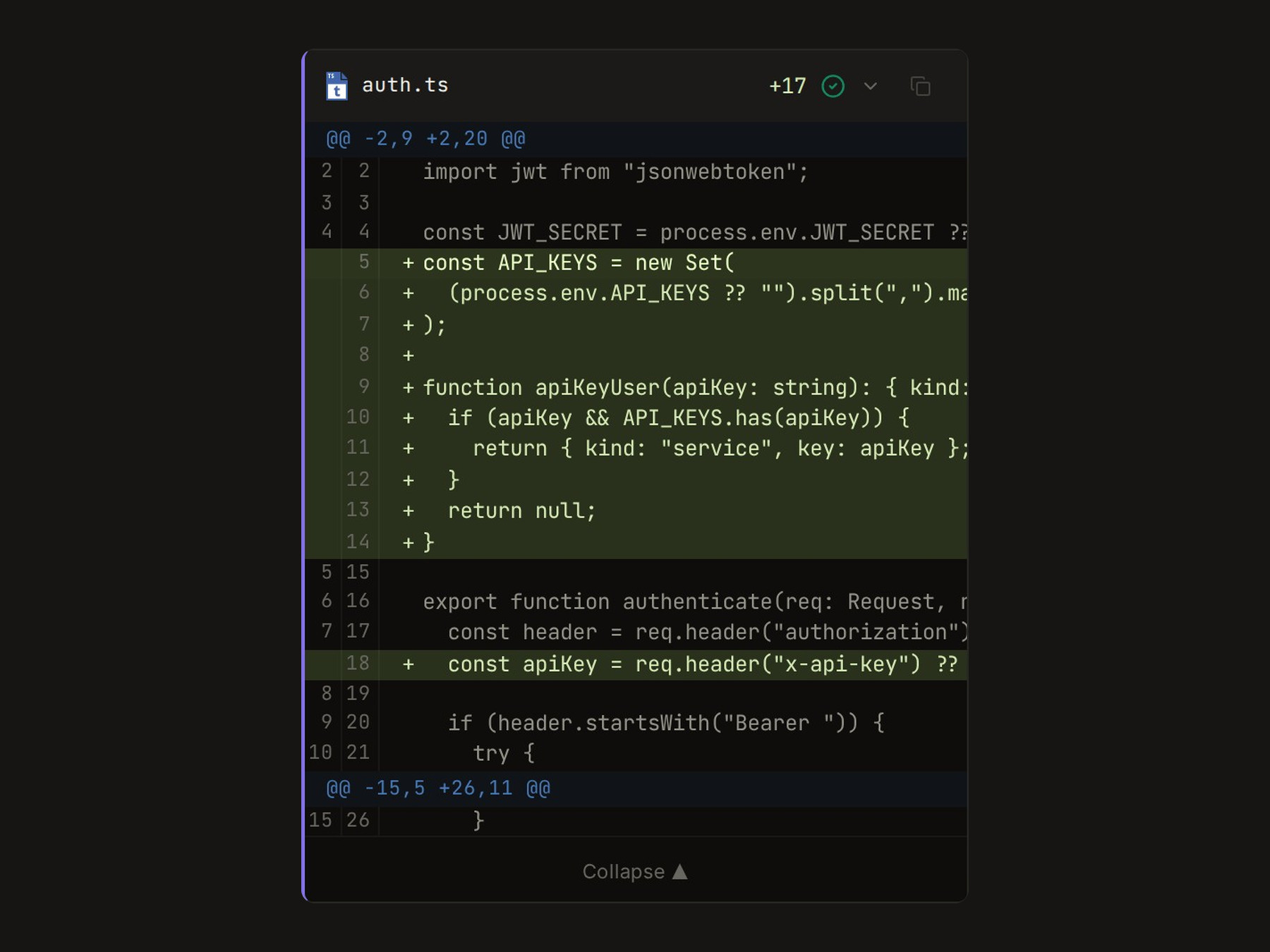
The backend follows the active model unless you pin it with
agent.edit_tool in configs/app.json.
search_replace_block (Aider-style)
aider_edit_block_tool parses SEARCH/REPLACE blocks from a freeform text payload and applies
them atomically. Claude models default here.
Format
src/utils.py
```text
<<<<<<< SEARCH
def old_function():
    return 1
=======
def new_function():
    return 2
>>>>>>> REPLACE
Rules

- The filename line must appear immediately before the opening fence.
- The `SEARCH` section must match the file content **exactly**, whitespace included.
- A line containing only `...` in both sections skips the unchanged span between them.
- Shell code blocks inside the content are rejected.

**Parameters:**

| Parameter | Type | Required | Description |
|---|---|---|---|
| `content` | string | Yes | Full `SEARCH/REPLACE` block text (one or more blocks) |
| `root` | string | No | Project root for path resolution (defaults to CWD) |
| `files` | array of strings | No | Allowlist of filenames the tool may touch |

### structured_patch

`file_edit_tool` substitutes one exact string in one file. Models that prefer structured JSON tool
calls default here, including GPT-5, the o-series, Codex, and GPT-4.

**Parameters:**

| Parameter | Type | Required | Description |
|---|---|---|---|
| `file_path` | string | Yes | Path to the file to edit |
| `old_string` | string | Yes | Exact string to find and replace |
| `new_string` | string | Yes | Replacement string (may be empty to delete) |
| `replace_all` | boolean | No | Replace all occurrences; defaults to `false` |
| `root` | string | No | Project root for path resolution |

An empty `old_string` **appends** `new_string`, creating the file first if it does not exist. A
string that matches more than once returns an error rather than an ambiguous edit, unless
`replace_all` is set.

---

## aider_shell_tool

`aider_shell_tool` runs an arbitrary shell command and returns stdout, stderr, exit code, and
elapsed time.

<div style="display: flex; justify-content: center;">
  <img src="../assets/img/mewbo-console-shell-log.jpg" alt="A shell tool card in the Mewbo console showing an npm test run with four passing auth-middleware tests and a 1s duration" style="width: 100%; max-width: 720px; height: auto;" />
</div>

### Parameters

| Parameter | Type | Required | Description |
|---|---|---|---|
| `command` | string | Yes | Shell command to execute |
| `cwd` | string | No | Working directory (defaults to `root`, then CWD) |
| `root` | string | No | Project root used for safe-path resolution |
| `timeout` | number | No | Seconds before a foreground command is killed (default 115) |
| `run_in_background` | boolean | No | Return a `shell_id` immediately instead of waiting |
| `tty` | boolean | No | Allocate a pseudo-terminal so the command can be driven interactively |

### Behavior notes

- A `cwd` outside the resolved `root` raises a path validation error.
- Stdout and stderr are merged into the `stdout` field.
- Shell invocations never run in parallel with other write tools in the same step.
- Shell invocations require approval in the default permission policy. See
  [The Interface](terminal/interface.md).
- A foreground command gets no writable stdin. A pager or a credential prompt returns immediately
  instead of blocking until the timeout.
- With `run_in_background`, the response carries a `shell_id` in place of `exit_code` and
  `duration_ms`, and the command keeps running in its own process group.

### Filesystem scope

`cwd` sets where a command starts, not what it can reach. A shell command is opaque, so `cat`,
`grep`, or a Python one liner can read anywhere from there. The Linux kernel's Landlock LSM closes
that gap, under [`agent.shell_sandbox`](configuration.md#agent) and on by default.

See [Sandboxed Execution](features-sandbox.md) for what is denied, how to widen the scope with
`allowed_paths`, what happens on a kernel without Landlock, and what the sandbox does not cover.

---

## shell_session_tool

`shell_session_tool` reads output from, sends input to, and stops a command started with
`run_in_background`. Without it, a background start becomes a process nothing can reach.

### Parameters

| Parameter | Type | Required | Description |
|---|---|---|---|
| `operation` | string | Yes | `read`, `write`, `kill`, or `list` |
| `shell_id` | string | For all but `list` | Handle returned by `run_in_background` |
| `input` | string | No | Text sent to stdin (`write`) |
| `newline` | boolean | No | Append a newline to `input` (default true) |
| `cursor` | integer | No | Return only output produced after this cursor |
| `filter` | string | No | Regular expression; only matching lines are shown |
| `wait_ms` | integer | No | Wait up to this many ms for new output (max 30000) |

### Example output

```json
{
  "shell_id": "shell_1",
  "command": "npm run dev",
  "status": "running",
  "exit_code": null,
  "output": "  ➜  Local:   http://localhost:5173/\n",
  "cursor": 812
}
Behavior notes
- Reads are incremental. Pass back the previous
cursorto get only what arrived since. Omit it to get everything retained. statuscomes from the process, not from its output. A buffered command can print nothing at all, so an empty read never means the process is done.filteris display only. It never consumes output, and a filtered read leaves the cursor exactly where an unfiltered one would.missed_charactersmeans output was evicted from the buffer before it was read. It is unrecoverable. Read more often or narrow the command's own output.writereads the reply back in the same call, so answering an interactive prompt costs one step rather than two. Writing to an exited session is refused rather than silently discarded.killterminates the whole process group, sending SIGTERM and then SIGKILL after a grace period, so children die with the command.- Sessions are capped. Finished sessions are evicted and idle ones reaped. When every slot holds a running command, a new background start is refused with a message naming the cap.
aider_list_dir_tool
aider_list_dir_tool recursively lists every file under a directory, with paths relative to root.
Parameters
| Parameter | Type | Required | Description |
|---|---|---|---|
path |
string | Yes | Directory path to list |
root |
string | No | Project root (defaults to CWD); listed paths are relative to this |
max_entries |
integer | No | Maximum number of entries to return |
update_todos
update_todos records the agent's current task list so you can watch a long run make progress
rather than guess at it. It is what drives the todo dock in
The Interface and the progress card in
Sessions. Those surfaces read one todos event, never parsed text, so what you
see is what the run recorded.
Parameters
| Parameter | Type | Required | Description |
|---|---|---|---|
todos |
array | Yes | The full ordered list, each item a label and a status of pending, in_progress, or completed |
Behavior notes
- Every call carries the whole list, never a change to it. The newest call replaces what is displayed, so an item dropped from the array disappears from the dock.
- Exactly one item is in progress at a time, which is what makes the dock readable at a glance.
- The call does not end the turn. It publishes the list and the run continues in the same step, so an agent can update the list as often as the work changes.
- Root agent only, and act mode only. A plan mode turn drafts a plan for your approval instead, covered in Plan Mode. A sub-agent reports progress through its result rather than writing to the shared list, so one dock always describes one run.
ask_user_question
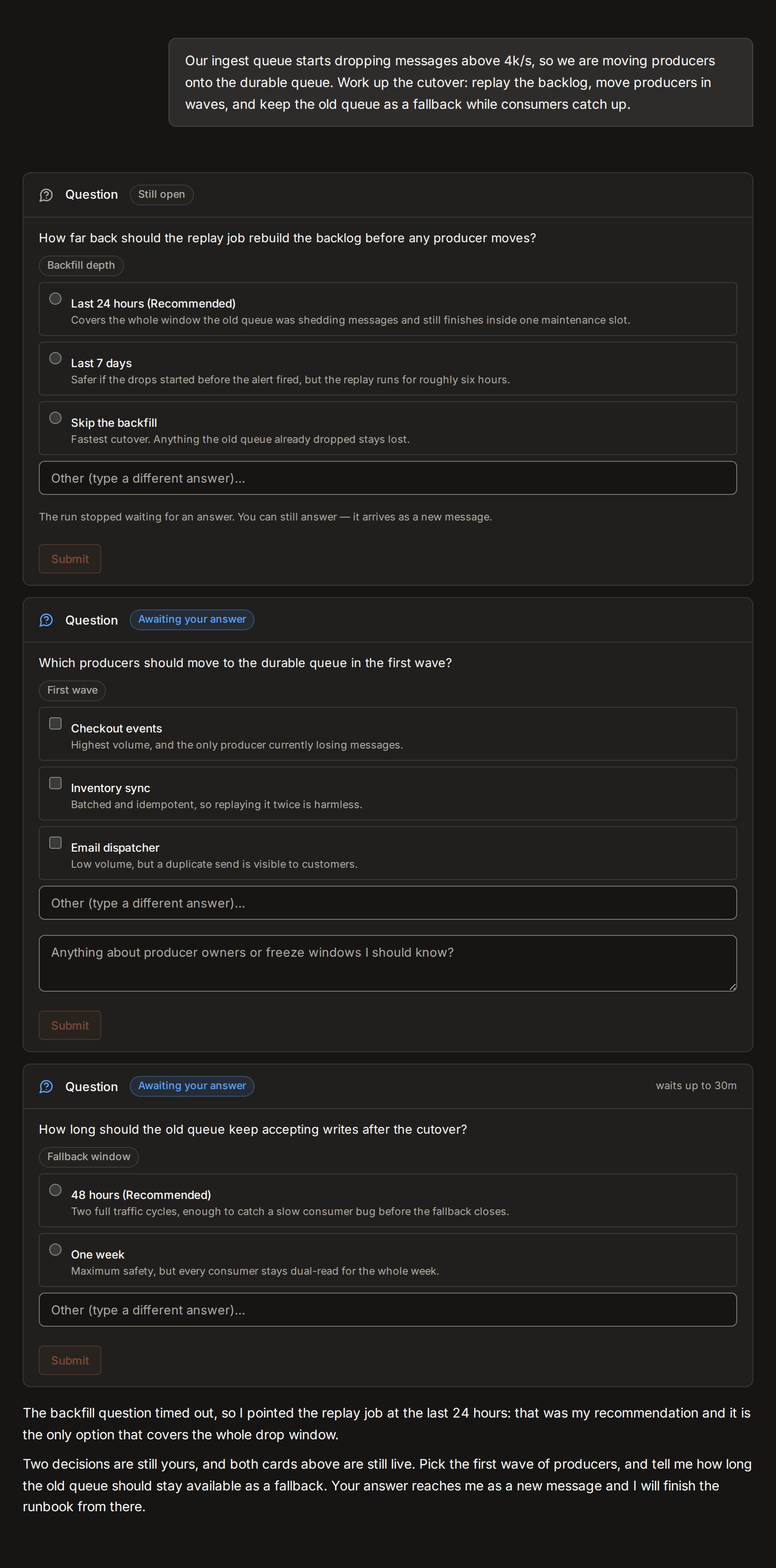
ask_user_question puts a decision back to you instead of guessing at it. The run blocks until you
answer by default, so nothing proceeds on a wrong assumption while you are away.
Set timeout_seconds and expiry produces a readable result rather than a failure. The question
stays answerable afterwards, and through a newer message or an API restart, so a late answer
arrives as a new message in the session.
Only the root agent binds it, and only when the client can actually ask you. Headless drives such as triggers and channels never bind it. A sub-agent reports open questions through its result.
Parameters
| Parameter | Type | Required | Description |
|---|---|---|---|
questions |
array | Yes | One to four questions, each with a short header, the question text, optional options (empty, or two to four {label, description} choices), and multi_select |
timeout_seconds |
integer | No | Seconds to wait before the call resolves as timed out; omit to wait indefinitely |
notes_placeholder |
string | No | Hint text for an optional free-text notes box shown alongside the questions |
Behavior notes
- The answer returns as an ordinary tool result, so the run continues in place. There is no default answer concept and no timeout policy switch.
- Sending a new message while a question is pending supersedes it. The message is addressed instead.
- Each question is answered with selected option indexes or with free text, never both, plus the optional notes for the group as a whole. Free text is accepted even when options are offered.
present_ui
present_ui draws a structured panel inline in the conversation, so a status board or a comparison
arrives laid out rather than described in prose. The agent composes a tree from a fixed vocabulary
of eleven components and this tool validates it, computes a plain-text rendering of it, and
publishes one generative_ui event that the console draws. Panels covers the
vocabulary component by component and is the page to read before asking for one.
Parameters
| Parameter | Type | Required | Description |
|---|---|---|---|
root |
array | Yes | The component tree: a top-level array of typed nodes, with no wrapper object around it |
summary |
string | Yes | One short line naming what the panel shows, up to 200 characters |
ui_id |
string | No | The id of the panel being addressed. Omit to create a new panel; the agent may author a readable id of its own |
operation |
string | No | replace (default) redraws the whole panel; append adds the nodes in root to an existing panel; update swaps the one container named by target for the single node in root |
target |
string | No | A container id (the id given to a Card or Stack) that append adds into or update replaces |
Behavior notes
- The model fills in fields, it never writes markup. There is no HTML, no styling and no code in a panel, and nothing executes. That is the difference from a widget, which is a small sandboxed program built for results that want a chart or a control you can move. The two are alternatives rather than layers, and a panel is the cheaper one.
- The call does not end the turn, so the agent presents a panel mid-run and still writes its closing reply.
- A rich panel is built across several small calls, not one large one. A
CardorStackmay carry anid, and later calls append into or update that container by name. Every emitted event still carries the complete tree, so other clients and replay see ordinary panel replacements. - It is bound only when the client advertises the
generative_uicapability. The console does, on every request. A CLI, email or chat session never binds the tool, which is why every panel also carries the plain-text rendering computed when it was presented. - The limits are hard, and a tree that overruns one is refused rather than trimmed. A panel holds at most 200 nodes nested at most 8 levels deep and serializes to at most 200,000 characters. A code block is capped at 20,000 characters, a paragraph at 2,000, a table or definition value at 500. The refusal returns the validation error, so the agent can correct the tree and present it again.
- A component the console does not ship renders as a placeholder row, and a link is accepted
only for
http,https, andmailtodestinations. Both are boundaries rather than niceties, since a panel is drawn from a tree a model authored.
list_projects
list_projects enumerates every project the running session could move into. That covers
directories an operator registered by hand, projects and worktrees Mewbo manages itself, and git
repositories registered with Mewbo.
Each entry reports a key, a name, a kind of configured, managed, worktree, or repository, a
description, whether it is available on disk, and its repository slug and branch when known. A
registered repository with no checkout still appears, with nothing to work on until one exists.
The tool takes no parameters. It exists only in auto workspace mode, and only for the root agent.
switch_project
switch_project moves the running session into one of the projects list_projects reported. The
working directory changes, and the target project's CLAUDE.md or AGENTS.md instructions load as
described in Project Configuration.
Parameters
| Parameter | Type | Required | Description |
|---|---|---|---|
project |
string | Yes | The key of a project reported by list_projects |
Behavior notes
- Switching into a key that does not exist, or a registered repository with no checkout, is refused rather than silently falling back to the previous directory.
- Call it repeatedly. A task spanning two projects switches back and forth as needed.
- A switch never grants more tools than the run started with. The registry is rebuilt for the new
directory, then narrowed to what the agent already held, so a project's own
.mcp.jsonservers are not admitted partway through a run. A fresh session against that project resolves them normally. Skills accumulate instead, so plugin and user skills survive a switch. - Like
list_projects, this tool is root agent only and auto workspace mode only. A sub-agent spawned after the call inherits the new directory, one already running keeps the directory it started in, and neither can change the scope of the whole session.
tool_search
tool_search returns the full JSON schema of a tool that was not bound at the start of the turn,
which is what makes that tool callable. It exists because every bound schema is re-sent on every
request. A fleet of MCP servers can spend tens of thousands of tokens per turn before the model has
done anything, and a crowded tool surface degrades tool choice, because the tool the task needs sits
among a hundred it does not.
So Mewbo defers instead. Deferrable schemas are stripped from the initial bind and their names
arrive as a compact list. The model searches for what the task needs, the matched schemas come back
as an ordinary tool result, and only those tools are rebound. Deferral covers MCP tools and any
built-in marked deferrable. tool_search itself is always bound, so it is reachable on turn one.
The runner lives in
tool_search.py.
Parameters
| Parameter | Type | Required | Description |
|---|---|---|---|
query |
string | Yes | select:tool_a,tool_b to fetch named tools directly, or keywords for a fuzzy search. Prefix a term with + to require it |
max_results |
integer | No | Maximum matches to return; defaults to 5 |
Behavior notes
- Deferral is on by default, under
agent.tool_search. A session with no MCP servers pays nothing for it, because deferral only engages once the deferrable set is non empty. Turn it off when your tool surface is small and you would rather every schema be present from turn one. The modes and the adaptive threshold are covered in External MCP Tools. - It costs a round trip. A deferred tool is not callable until its schema has been fetched, so the first use of one spends an extra step. Worse, a tool the model never searches for is a tool it never finds, so a server with vague tool names or thin descriptions can go unused while everything reports healthy. Name and describe your MCP tools for a reader who has only the name.
- Search never widens scope. It searches only what the running agent was already granted, so a tightly scoped sub-agent cannot reach a tool through it that it was denied.
- It is exempt from
allowed_tools. Scoping an agent down to a short tool list still leavestool_searchbound, otherwise that agent could never reach its own deferred tools. - Discovery replays from the conversation. Which schemas were fetched is recovered from the message history rather than held in memory, so it survives compaction.
Configuring the edit tool
Leave agent.edit_tool empty, the default, and the backend follows the active model. Set it to
force one backend.
| Value | Backend | When to use |
|---|---|---|
"" (empty, default) |
Auto (chosen per model) | Recommended for mixed-model deployments |
"search_replace_block" |
aider_edit_block_tool |
Force Aider format regardless of model |
"structured_patch" |
file_edit_tool |
Force JSON patch format regardless of model |
{
  "agent": {
    "edit_tool": "structured_patch"
  }
}
How it works internally