Ask across connected sources
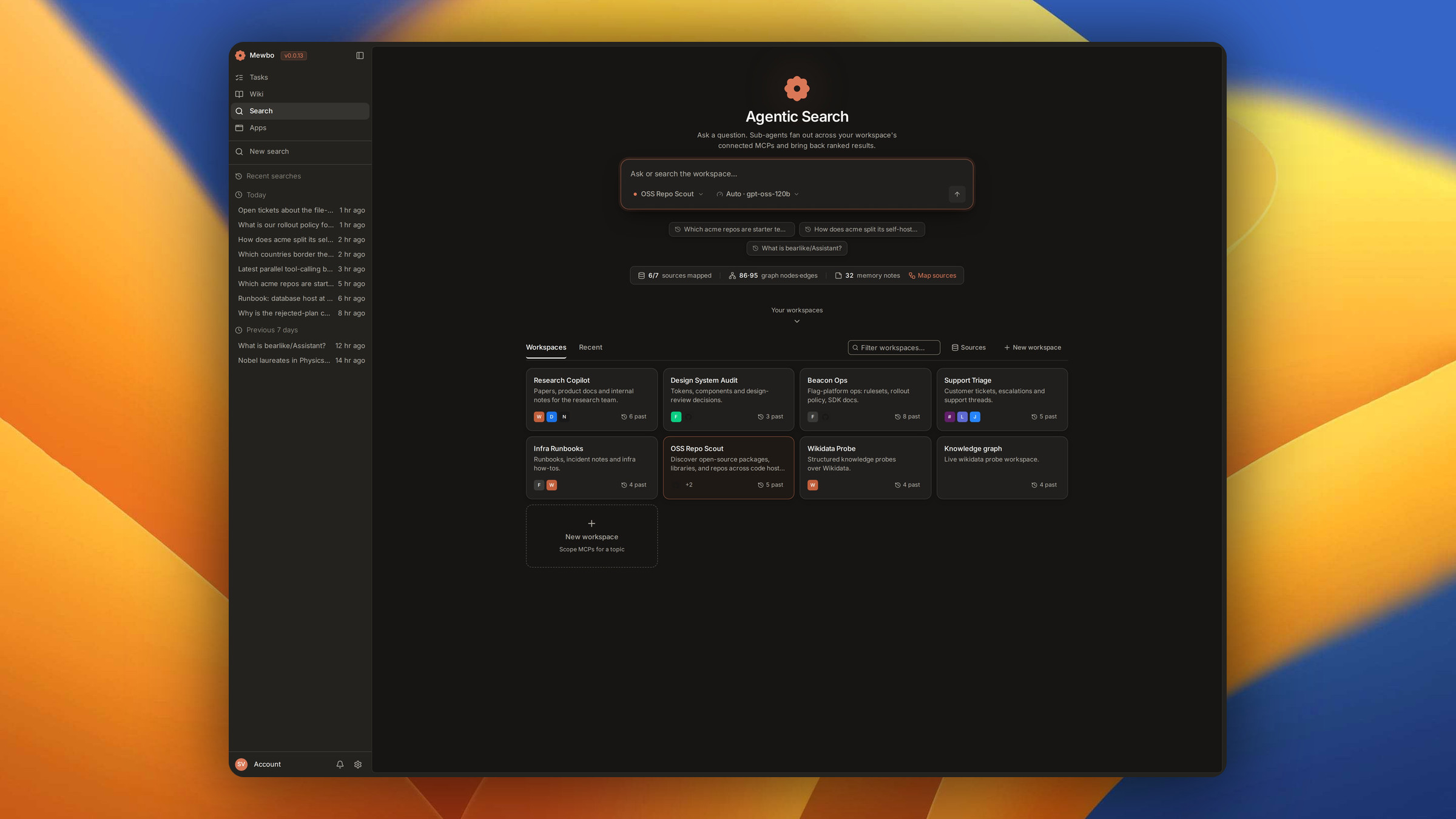
Ask a question in plain English and Mewbo searches everything you have connected. A coordinating agent splits the question, routes each part through the Source Capability Graph, and fans out probe agents to run the retrieval. Back comes one ranked answer with citations and the trace that produced it.
Workspaces scope the search
A workspace is a named bundle of connected sources for one topic. Engineering docs might point at your repos and RFCs, Support intel at customer tickets and Slack threads. Every question runs against the workspace you pick, so a query about a customer issue never trawls your design system.
Make one per question domain. Name it, choose which MCP servers it reaches, and start asking.
Edit the purpose, re-index the graph
The edit button on a workspace card opens its name, its sources, and a Purpose & instructions field that seeds the enrichment step run when sources are mapped.
Save a change to the purpose, the description or the sources and Mewbo re-maps and re-enriches in the background. A change to the name alone leaves the graph untouched.
See what a workspace knows
The graph button opens the workspace's capability graph, served by GET/api/agentic_search/workspaces/{workspace_id}/graph. Schema holds capability, entity type and field nodes, Memory the notes past runs deposited, and Entity the concepts resolved across sources.
A source you enabled but have not mapped appears as a ghost node, so a partly configured workspace is visible instead of silently smaller.
One question, parallel probe agents
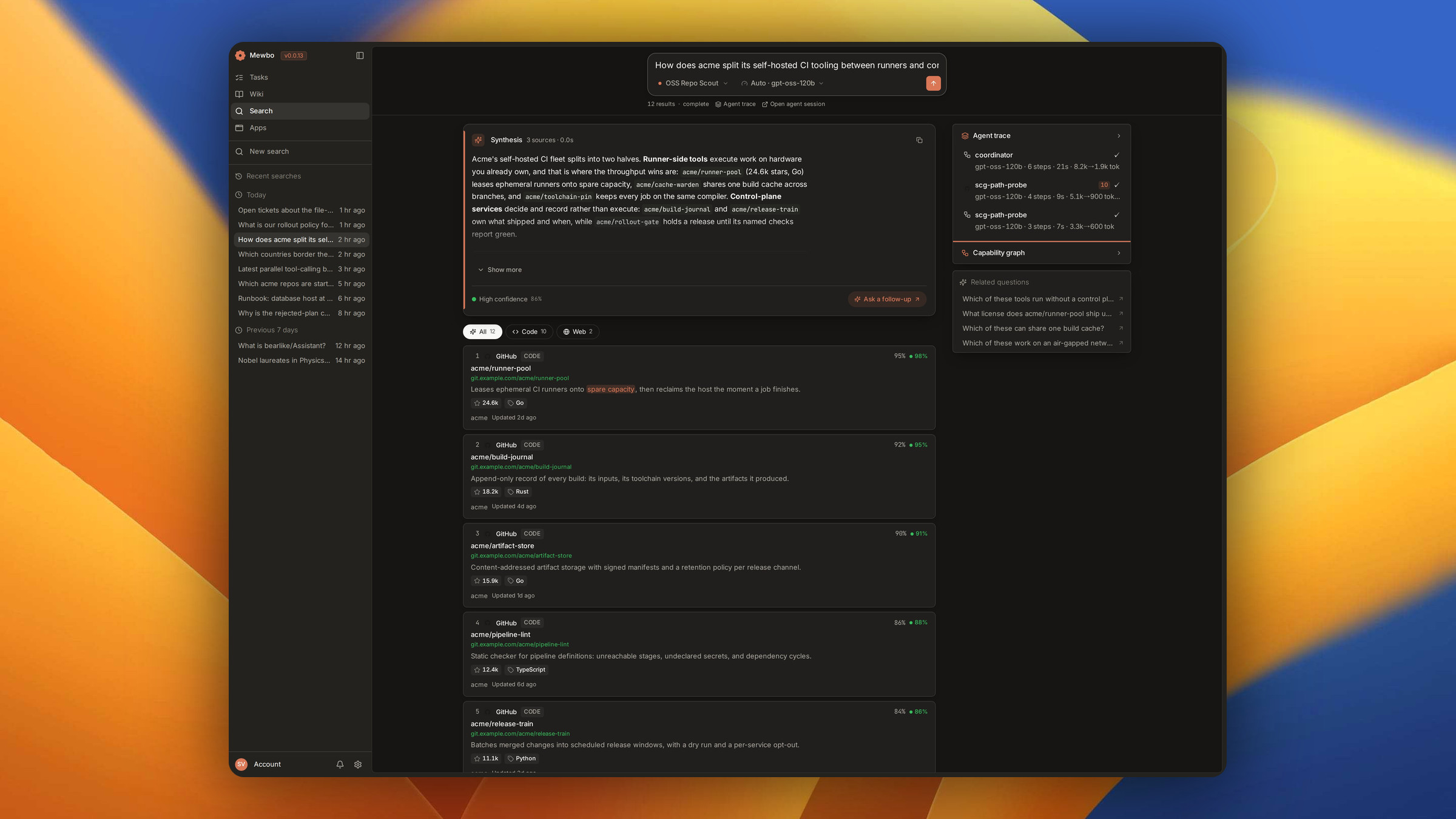
A single scg-search agent owns the query lifecycle. It calls scg_route for the highest ranked
pathways, then spawns a bounded set of probe agents, each scoped to one pathway and running in
parallel. A typical query resolves in seconds.
That fan-out sits on the same hypervisor as every other Mewbo task, so you can watch and steer it.
How the routing works
Every routing decision is made before any data is fetched. The Source Capability Graph has the mechanics.
Search tiers
Every search runs at one of three tiers, chosen per query. The tier is the run's single knob.
| Tier | Sub-query decomposition | Probe fan-out | Default model | Best for |
|---|---|---|---|---|
| Fast | 1 | 2 | openai/gpt-oss-120b |
Quick lookups; known-answer retrieval |
| Auto (default) | 2–3 | 3 | openai/gpt-oss-120b |
General multi-source questions |
| Deep | 3–5 | 5 | openai/gpt-oss-120b |
Exhaustive research; cross-source synthesis |
The mapping lives at scg.traversal.tier_models, editable in Settings. Probe agents inherit the
session model, so one tier choice moves the whole run. A blank mapping or an unrecognised tier falls
back to llm.default_model rather than erroring, and an explicit model on the request beats the
tier map.
Tiers add no verification rounds and no consensus voting. Each probe agent queries its connector directly. A pathway that returns data grounds the answer, one that returns nothing is marked a miss.
A synthesised answer, with receipts
The top of every result is a Synthesis card, a written answer rather than ten blue links. Each claim links to the result it came from. The confidence score is how many independent pathways returned corroborating evidence, weighted by each probe agent's relevance scores.
Below it the results are listed in rank order with source, status and a snippet. One click filters to Docs, Code, Threads, Design, Tickets or Web.
Ask a follow-up keeps the workspace and context, so you need not scope again.
Tip
When a workspace includes a project the Agentic Wiki has indexed, results touching that codebase draw on the wiki's entity and memory layers with no extra setup. → The shared multiplex graph
See how it got there
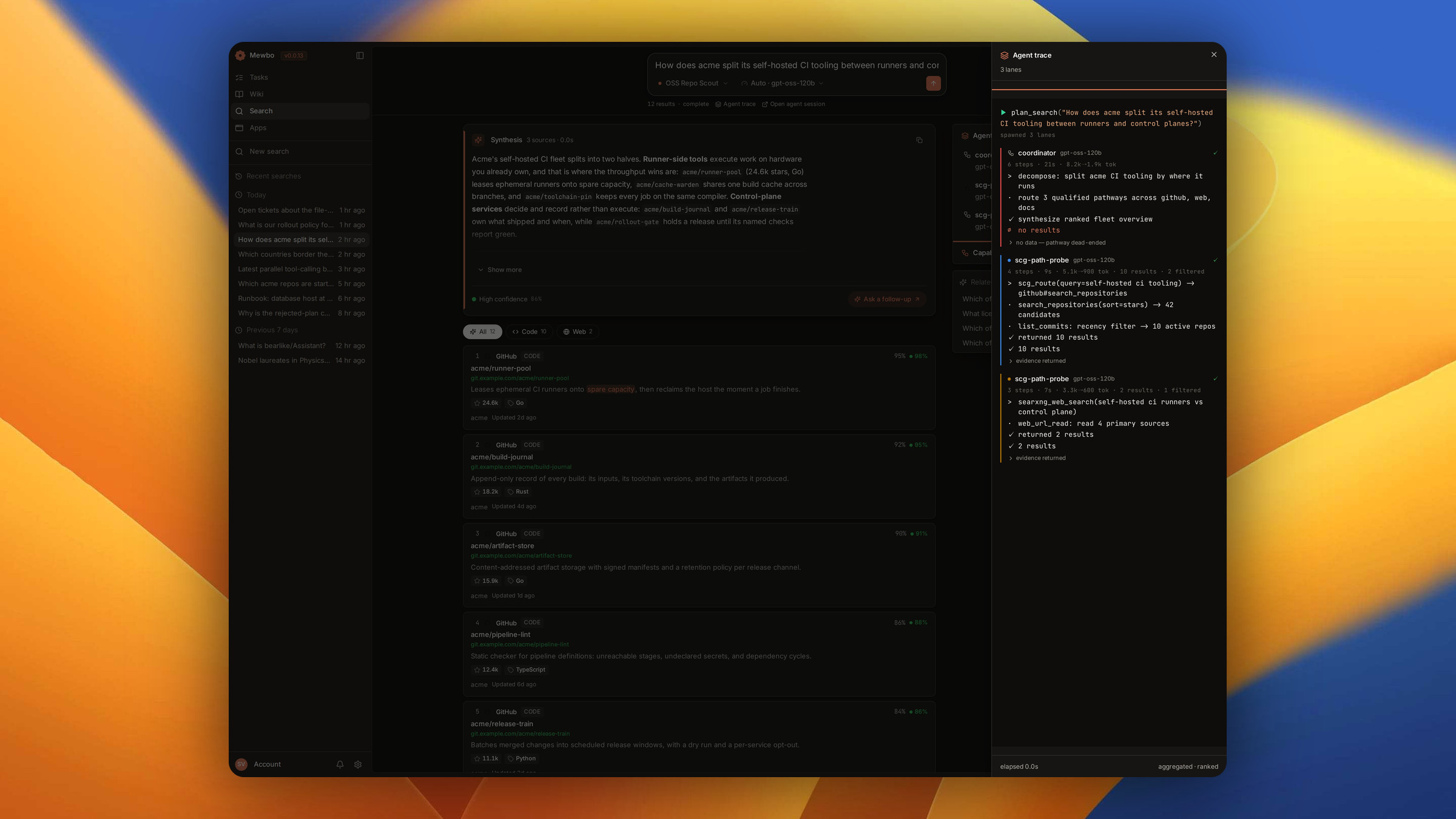
The agent trace names which sources were queried and which returned a hit. Related questions are the obvious next ones. People are whoever authored, merged or reported the artefacts behind the answer.
Share a run with a link
Every run has a stable, shareable URL, /search?ws=<workspace>&run=<run>. It renders the synthesis,
results and trace from one durable snapshot, then attaches live updates if the run is still in
flight. The link resolves the same run for anyone with access, survives a restart, and stays linked
to the session behind it.
Programmatic access via MCP
External agents and pipelines search through the MCP server.
| Tool | What it does |
|---|---|
list_search_workspaces |
Each workspace's id, name and sources. An optional query filters by name, description or past-query text. |
search |
Query a workspace by id or name for a cited answer, optionally scoped to one project. |
get_search_run |
Fetch a prior run, for a long search or to replay a result. |
Two detail tiers. answer is the default, returning the synthesis and a compact result index.
full adds a snippet per result and entity insights.
Tip
For validated JSON rather than prose, the Structured Outputs endpoint runs an agentic session grounded in a search workspace and emits an object matching your schema.
Availability
Agentic Search lives in the Mewbo Console, next to Tasks and Wiki.
Enabling search
Orchestrated search ships disabled. Three steps turn it on.
- Enable the SCG switch in Settings, the
scg.enabledkey. - Open Sources on the Search landing page and map each source you want searchable. Mapping introspects its schema and builds its capability subgraph, streaming progress that survives a reload.
- Pick a tier next to the search bar. The default comes from
scg.traversal.default_tier.
Until then queries run against bundled demo fixtures. The switch to real orchestrated runs takes effect on the next query, with no restart.
Going deeper
External Tools (MCP) covers how connected sources are configured, and Sub-agents covers the hypervisor that bounds the fan-out.