Start a session on an event
A session doesn't have to stay open to wait for something. An agent can arm a trigger, a durable wake me up record, and end its turn. No session sits open and no tokens are spent meanwhile. When the condition is met, Mewbo reengages the session with the instruction the agent left for itself.
This is the reverse of Automation, which is the world pushing work into Mewbo. A trigger is a session reaching out to be woken later by a clock, a CI run, a pull request event, or a webhook.
What an agent uses it for
Inside a running session, the model has a schedule_trigger tool. A deploy that takes twenty minutes does not need a session held open for twenty minutes. The agent arms a trigger against the CI run and ends the turn.
When the trigger fires, the orchestrator reinvokes the same session with the trigger's wake_prompt, the instruction the agent wrote for its future self. The session resumes with its full history intact.
schedule_trigger also lists and cancels the triggers the current session has armed. Arming is deliberately scoped to the session's own agent turn, never exposed as a general-purpose REST mutation. See session_tool.py.
The five kinds
Every trigger declares one kind, with no custom scripting. The agent picks a kind and fills its fields, defined in spec.py.
| Kind | Fires when | Notes |
|---|---|---|
time.at |
A specific wall-clock instant passes | Fires exactly once. |
time.cron |
A cron schedule is due | Repeats, anchored on the last fire rather than now, so downtime never causes a catch-up burst; the missed slot fires once and re-anchors. |
ci.workflow |
A CI run on a repo completes | Matches a specific run_id, or the next completed run of a named workflow. Optionally filtered by ref or conclusion, such as success or failure. |
forge.pr |
A pull request reaches a lifecycle event | Events: merged, review, comment, ci_status; see the polling limitation below. |
webhook |
An inbound HTTP request presents the right secret | Fires on anything: a third-party service, a script, a manual curl. See the capability URL below. |
Table 1. The five trigger kinds and what wakes each one.
A trigger can cap its own fire count with max_fires. It also expires on its own at expires_at if nothing happens by then, defaulted per deployment when the agent sets none.
Watching and managing triggers
Outside the session that armed them, triggers are visible over the REST API and the console:
| Action | Endpoint |
|---|---|
| List triggers, filterable by session, kind, or status | GET/api/triggers |
| List one session's triggers | GET/api/sessions/{session_id}/triggers |
| Pause or resume a trigger | PATCH/api/triggers/{trigger_id} with {"status": "paused"} or {"status": "armed"} |
| Cancel a trigger | DELETE/api/triggers/{trigger_id} — idempotent; calling it again on an already finished trigger just reports its status |
A trigger sits in one of six statuses. The four on the right are terminal and never run again.
stateDiagram-v2
    [*] --> armed
    armed --> paused: PATCH status paused
    paused --> armed: PATCH status armed
    armed --> completed: max_fires reached
    armed --> failed: max_consecutive_failures in a row
    armed --> expired: expires_at passed
    armed --> cancelled: DELETE, or the session terminates
    paused --> cancelled: DELETE, or the session terminates
    completed --> [*]
    failed --> [*]
    expired --> [*]
    cancelled --> [*]
Pausing keeps the trigger's state rather than resetting it, so resuming picks up where it left off. Only an armed trigger is swept for expiry, so a paused one does not expire while it waits.
The console's trigger dashboard is the same surface for a human operator.
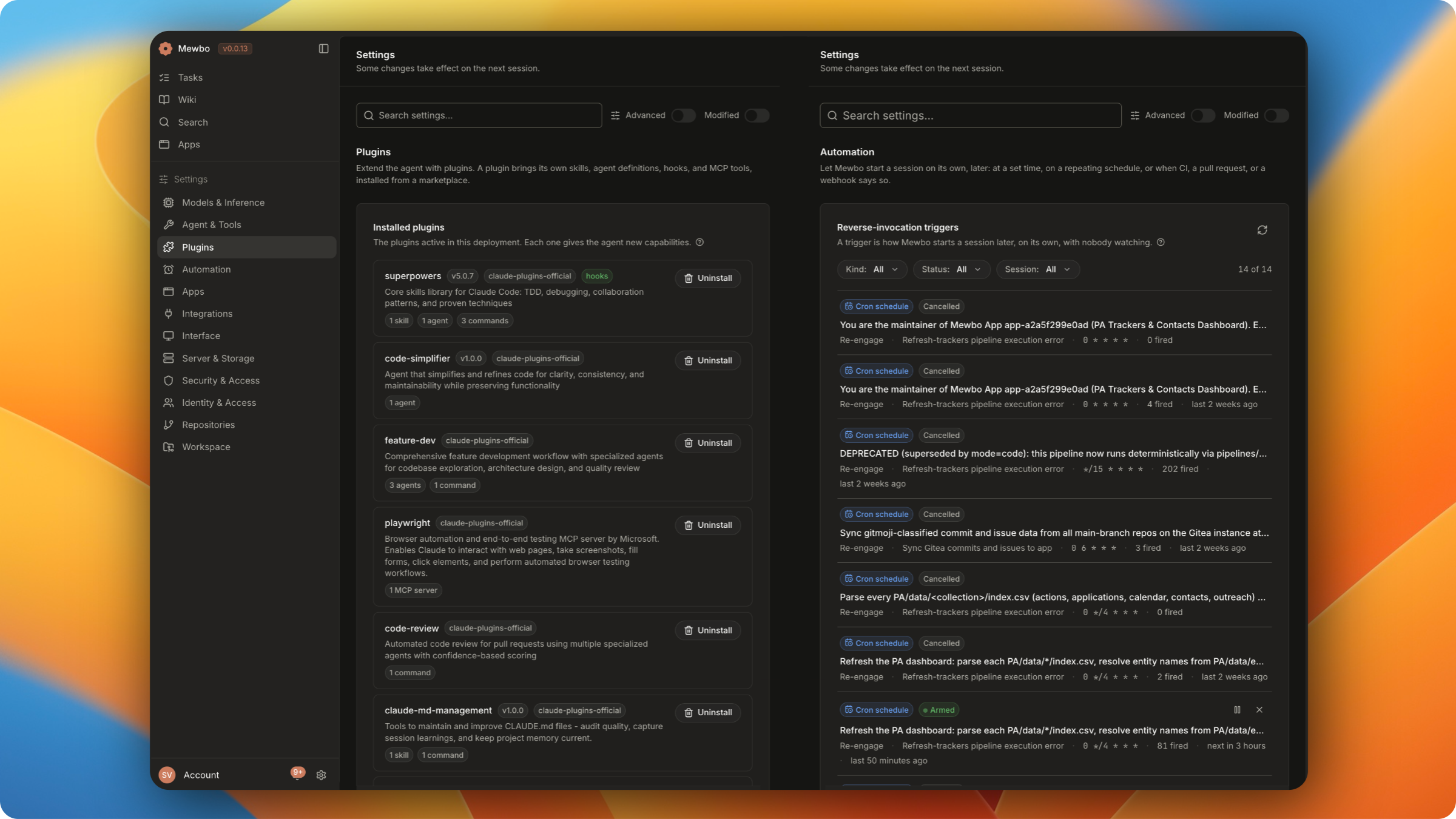
The MCP Server exposes the read side to external agents through list_triggers and cancel_trigger. There is deliberately no MCP tool to create one.
The webhook capability URL
A webhook trigger doesn't need an API key. Arming one mints a unique, unauthenticated URL:
POST /api/triggers/hook/{trigger_id}/{secret}
The id and secret together are the credential. Anything that can send an HTTP POST to that URL fires the trigger. An optional hmac_header adds a second check, a valid HMAC-SHA256 signature over the raw body, verified first.
A wrong secret, an unknown id, a paused or finished trigger, or the wrong kind all return the same 404, with no way to tell which reason applies. A leaked URL hands out nothing about what exists.
The forge-polling limitation
ci.workflow and forge.pr triggers poll the forge's REST API on a fixed cadence, triggers.poll_interval_seconds, rather than reading a live webhook feed. Polling detects terminal, idempotent state well, because rechecking the same state twice is harmless.
It deliberately does not synthesize review or comment events. Nothing tracks which comments a trigger has already seen, so reannouncing a comment exists on every poll would either spam the session or misreport what is new. A forge.pr trigger listing only review or comment in its events never fires from the poller.
Both events already have a home. A review or comment mentioning the bot account arrives through Automation's vcs-pickup mention path, or through a webhook trigger wired to the forge's webhook settings. Either one delivers the event immediately instead of waiting on a poll.
Configuration
The whole subsystem is off by default, so a stock deployment pays nothing for it until an operator turns it on. These four keys are the ones you act on.
| Key | Default | Purpose |
|---|---|---|
triggers.enabled |
false |
Master switch for the firing watcher. Management routes above still work when off; nothing fires until this is on. |
triggers.poll_interval_seconds |
60.0 |
Cadence for polling the forge REST API for ci.workflow / forge.pr triggers. |
triggers.max_armed_per_session |
20 |
Ceiling on triggers one session may hold armed at once. |
triggers.max_fires_cap |
100 |
Hard ceiling on a trigger's own max_fires at arm time. |
The watcher cadence, the failure ceiling, the default expiry, the cron floor, and the webhook body cap are documented with their defaults under Triggers in the Configuration Reference. The admission limits mirror TriggerPolicy field for field, and the firing pipeline lives in service.py.
Related resources
- Building a Client explains that terminating a session cancels its armed triggers.
- REST API Reference lists every trigger route, parameter, and response shape.